Learn 100+ AI & Digital Skills in MS-CIT
Syllabus
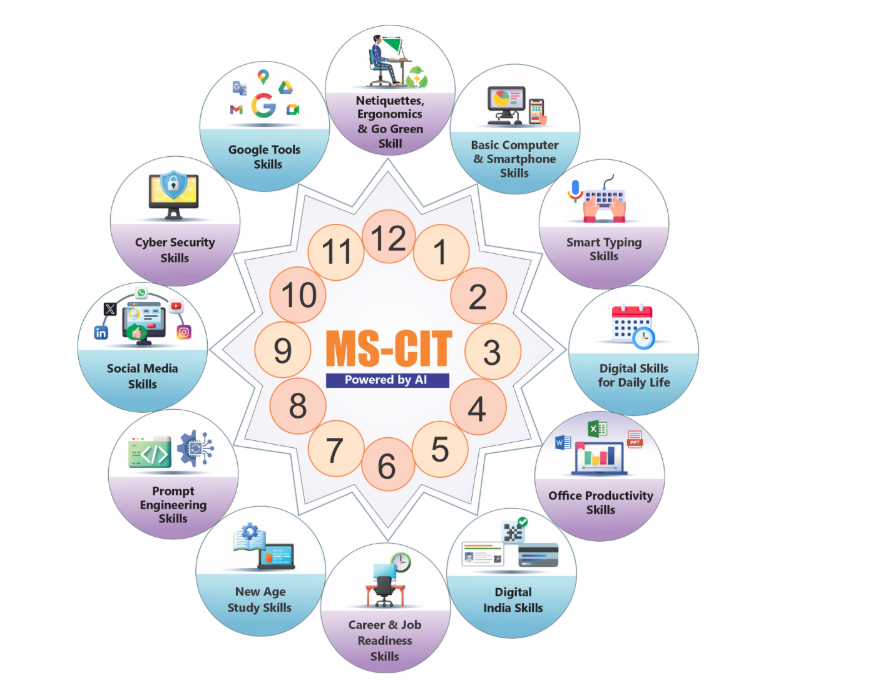
Basic Computer and Smartphone Skills
Various Information Technology Concepts and Awareness about inventions and discoveries
- What is booting?
- Google Name Story
- What is Data?
- Google’s Self-Driving Car
- Know about Information System
- What is Software?
- Google Project Loon
- What is Hardware?
- Google Glass
- Various Types of Micro Computer
- Smart Watches
- Know about Working of Computer
- Flexible Technology
- Use of Internet for Entertainment
- Transparent Technology
- Uses of the internet for education
- Know about Internet & Web
- What is Browser?
- What is URL & Hyperlink
- What is Email?
- What is Instant Messaging?
- What is WWW?
- What is e-commerce?
- Electronic Commerce Securities
- Using Wikipedia
- Domain Name
- What is Social Networking
- Mark Zuckerberg
- Internet Service Provider
- Budhayana
- About Internet Modem
- World Wide Web’s History
- File Transfer Protocol
- Navigation Technology
- Web Based Applications
- Takshashila
- Plugins and Extensions
- Homi Bhabha
- Filters
- Larry Page
- Content Evaluation & Internet Security Suites
- Home Network and Wifi
- Device Drivers
- Device Drivers
- Disk cleanup and defragmenter
- Motherboard
- Microprocessor Chips
- Specialty Processors
- Bus Lines
- About AC and DC Power Supply
- Bus Line
- What is Binary system & Binary coding scheme?
- Power Supply
- Power Supply Unit
- What is Input?
- Digital Camera
- About Output Device
- QWERTY
- About Features of monitor
- Voice Recognition Systems
- 3D Printing
- Card Reader
- Bill Gates
- About Storage
- Optical Disc
- C.V. Raman
- Hard Disk and RAID
- Steve Jobs
- Using Solid State Storage
- Mass Storage Devices
- Tim Berners Lee
- Internet Hard Drive
- What is Topology?
- Types of Network
- Robert Cailliau
- What is Protocol?
- Know about Physical Connection of Networks
- Analog and Digital
- Bandwidth
AI Tools
- Cortana / Microsoft Co-Pilot
- Google Assistant/Gemini
- Otter.ai
- ChatGPT
- IFFFT- Task Automation
- Digital Wellbeing – Google
- Google Fit
Digital Skills for Daily Life
For managing and living a better quality of life with the help of various mobile apps and websites
- I can use Internet Explorer to browse web pages
- I can create and operate an email account
- I can use Google Play Store and download apps (e.g. MKCL Learner App)
- I can use Paytm for cashless transactions
- I can find out correct GST Rates using GST Rate Finder app
- I can reset my email password
- I can add websites in favorite folder
- I can use BHIM App
- I can open a net banking account
- I am aware of the latest updates on GST Rates and GST Acts and Rules
- I can organize my photos and share it with others
- I can use my credit or debit card for online shopping
- I can recharge my mobile phone online
- I can pay electricity bill online
- I can pay telephone bill online
- I can configure and activate internet connection
- I can create and use Hotspot from my mobile
- I can listen to music, watch videos and share online
- I can use ShareIt app to share the files with others
- I can use CamScanner app to scan the documents
- I can print and save web pages
- I know importance of strong passwords
- I can communicate using Google Hangout
- I can build my network for professional up gradation
- I can quickly reply using Smart Reply feature in LinkedIn
- I can book movie tickets online
- I can use Ola Cabs app to book a cab online
- I can use Naukri.com app to search job online
- I can use GPS Route Finder app to easily track all the visited locations
- I can use an app to read newspaper online
- I can use Justdial to search for tutor services
- I can listen to my favorite songs on Saavn app
- I can use Flipkart app for online shopping
- I can sell old items online on OLX
- I can use Opera Mini app
- I can send and receive eFax
- I can send bulk messages
- I can use Truecaller app
- I can use Evernote app to access my notes everywhere
- I can type my messages in hands-free mode using Lipikaar App
- I can use Udemy app for learning and teaching online
- I can participate in a Webinar
- I can book train tickets online
- I can use MakeMyTrip app to organize my trip online
- I can track live flights using Flight Radar
- I can book air tickets online
- I can download images to set up wallpapers
- I can scan QR code using use Barcode Scanner app
- I can book gas refill online
- I can put my important files on a CD or DVD
- I can search for any location using Google Maps
- I can share my live location using WhatsApp
- I can enhance the performance of my computer
- I can transfer data between computer and other devices
- I can capture a screen using the snipping tool
- I can zip and unzip files to optimize the size
- I can protect computer from viruses
- I can connect computer to a projector
AI Tools
- ChatGPT
- DALL-E
- Todoist
- Notion
- Habitica
- Suno
- WhatsApp Meta/Meta AI
- Moises
- Zomato/Swiggy/Blinkit
- Amazon Alexa
- Leonardo AI
- Amazon Shopping
- Google Maps
- Google Keep
Office Productivity Skills
Knowledge of Office Automation tools to work effectively and smartly at workplace
- I can start a computer
- I can use mouse comfortably
- I can connect headset to PC
- I can use Paint Application
- I can personalize my desktop
- I can use keyboard efficiently
- I can create a file using Notepad application
- I can enhance my document using WordPad application
- I can interact with computer
- I can work with Windows
- I can log off and hibernate a laptop
- I can manage multiple programs at a time
- I can organize my files and folders
- I can rotate images in Bulk in Windows
- I can listen music using Windows Media Player
- I can use sticky notes
- I can pin items on taskbar and start menu
- I can use control panel
- I can change date and time settings
- I can change taskbar settings
- I can design a beautiful GREETING CARD
- I can design a VISITING CARD
- I can build a professional PROFILE (RESUME)
- I can design an attractive BROCHURE for summer camp
- I can create a REGISTRATION FORM
- I can create a good PROJECT REPORT
- I can create a professional INVITATION LETTER
- I can create an ENVELOPE
- I can create a LETTERHEAD
- I can create an impressive NEWSLETTER
- I can create a BLOG POST
- I can design a WEB PAGE using Word Processor
- I can create TO-DO LIST
- I can prepare an AGENDA
- I can create useful ADDRESS BOOK
- I can create a simple TIMESHEET
- I can manage my Donors DATABASE
- I can track EVENT EXPENSES more easily
- I can use Slicer to filter data as per my requirement using Microsoft Excel
- I can prepare personal BUDGET sheet quickly
- I can create a LOAN CALCULATOR
- I can create a monthly APPOINTMENT CALENDAR
- I can manage MEETING MINUTES quickly and easily
- I can create a CHECKLIST
- I can design beautiful GREETING CARD
- I can make a CERTIFICATE
- I can design a COMPANY PROFILE
- I can design a creative GIFT VOUCHER
- I can prepare effective TRAINING PRESENTATION
- I can prepare a professional BUSINESS PRESENTATION
- I can create a digital PRODUCT CATALOGUE
- I can create a DIGITAL PHOTO ALBUM
- I can record voice by using Sound Recorder
- I can design a SCHEDULE
- I can create a PERSONAL PORTFOLIO
- I can share my favorite songs with others
- I can design personalized STICKERS
- I can design an inspiring MAGAZINE COVER
- I can design a professional POSTER
- I can design Websites quickly using Google Sites
- I can create BLOOD STOCK database (Combined Output)
- I can create and send MAIL MERGE-NOTICE (Combined Output)
- I can create a GREETING CARD (Combined Output)
- I can create ATHLETICS EVENT MANAGEMENT sheet (Combined Output)
- I can create a PROJECT REPORT (Combined Output)
- I can SCHEDULE seminar (Combined Output)
AI Tools
- MS PowerPoint Designer
- MS-Excel Data Analysis
- MS PowerPoint Presentation Creation
- MS PowerPoint Speech Coaching/ Rehearse with Coach
- Microsoft Copilot
- MS-Outlook – Email Drafting
- Google Chrome/Gmail – Help Me Write
- Trello
- Asana
- Google Slide – Smart Compose
- ChatGPT
- MS Team – Meeting Summaries
- Otter.AI
Digital India Skills
To become a responsible citizen and avail various Government Services/Schemes
- I can get helpline numbers online or government services (complaint numbers)
- I can apply for Birth Certificate online
- I can apply for Duplicate Birth Certificate online
- I can Know all Emergency Numbers
- I can download forms
- I can find my Vehicle Details
- I can apply for Caste Certificate online
- I can apply for Application for Age, Nationality and Domicile Certificate online
- I can get my Soil Health card
- I can Book appointment online in Government Hospital
- I can apply for Aadhaar Card
- I can Download Aadhaar Card
- I can Verify and update Aadhaar Details
- I can use Rakshak App for safety of Women and Senior Citizens
- I can apply for BPL Certificate online
- I can get alerts from Central Government
- I can apply for Passport online
- I can Track Passport application Status online
- I can apply for Atal Pension Yojana online
- I can apply for Pradhanmantri Jeevan Jyoti Bima Yojana online
- I can apply for education loan
- I can Store Certificates Online using Digilocker
- I can use Google Drive to store my important files
- I can apply for Voter ID Card online
- I can search my Name in Voter ID Card List
- I can apply for Learner’s License online and book Appointment for Learner’s License Test
- I can apply for Driving License online
- I can get Trained about Disaster Management
- I can apply for PAN Card online
- I can Scan Documents and Store Online
- I can apply for Income Certificate online
- I can register my complaint on Consumer Forum
- I can make an appointment with Government officer online
- I can view my details on MGNREGA
- I can check my Provident Fund online
- I can file my income tax return
- I can apply for Pradhanmantri Suraksha Bima Yojana online
- I can apply for Marriage Certificate online
- I can access Right To Information Application
- I can apply for Ration Card online
- I can use mKisan Portal and Kisan App
- I can apply for Pradhanmantri Mudra Yojana online
- I can apply for Pradhanmantri Awas Yojana online
- I can apply for Water Connection online
- I can avail ePost Office service of India Post
- I can apply for Electricity Connection online
- I can check Weather status in my area
- I can avail LPG services online
- I can apply for Toilet Certificate online
- I can check my Property Records in the Government record
- I can check my Land Records in the Government record
- I can apply for Pradhanmantri Sukanya Samruddhi Yojana online
- I can Register FIR Online
- I can locate nearby Blood Bank
- I can apply for Startup Recognition online
- I can apply for Registration of Partnership Firm online
- I can apply for Senior Citizen Certificate online
- I can Track Status of Court Case
- I can know the Market Price
- I can apply for National Scholarship
- I can apply for Death Certificate online
- I can apply for Duplicate Death Certificate online
AI Tools
- eNAM
- GramCover
- Gram Swaraj
- Unified Farmer Service Interface (UFSI) – AgriStack
- Umang
- eSanjeevani
- Qure.AI
- SOUL
- NSDL
- Unified Lending Interface (ULI) & Unified Payment Interface (UPI)
Career & Job Readiness Skills
100% Practical Assignment base Teaching By Institute
- Resume – About Resume
- Resume – Do’s and Dont’s
- Resume – Apps and Sites
- Resume – Apply for suitable jobs online
- Resume – Uploading resume on a job portal
- Emails: using appropriate email Etiquettes, use Grammarly for impeccable communication in English
- Improved written and verbal English Communication using various Free Tools
- Typing various languages swiftly using Gboard – Google Keyboard
- Voice Typing using Google Docs
- Create textual or voice notes using Google Keep and share it with others quickly
- Searching various trending career options in IT
AI Tools
- Research Rabbit
- Iris.AI
- ChatGPT
- Meta AI
- GramTarang
- WriteSonic
- Freepik
- HeyGen
- Claude AI
New Age Study Skills
Transform to style of studying in 21st Century and getting its benefits to the fullest
- I can use Google to search more information about study topics
- I can listen to Online Stories / Classic Literature in any language
- I can search synonyms, antonyms, and thesaurus on dictionary.com
- I can use Wikipedia to search the information
- I watch educational videos online (YouTube)
- I can download eBooks
- I can improve my vocabulary using volt
- I can organize my day/ Notes, important points using Google Keep
- I can check for grammar and spell check
- I can keep track of my important events/ classes all in one place (Google Calendar)
- I can share notes during class & get doubts cleared in real time with my classmate’s Maths/Physics/Accounts (Google Docs)
- I can watch educational talks on TED Talks
- I can participate in Live Discussions (Facebook Live)
- I can learn by discussions in forums (quora.com)
- I can learn a new language by interacting with my phone with the duoLingo App
- I can join Massive Open Online Courses (MOOCs)
- I can join online courses on Coursera.org
- I can learn any subject online for free on edx
- I can learn from Best Colleges in the World – NPTEL
- I want to learn through videos on Khan Academy
- I can express my Ideas using Mindmap tool
- I can find information about The World via https://knoema.com/atlas
- I want to learn about the stars by using http://stars.chromeexperiments.com/
- I want to learn about History using Google Arts and Culture
- I can learn by playing games & improve my abilities – Elevate
- I can do science experiments – Physics
- I can do Math Experiments
- I can do science experiments – Chemistry
- I can test my IQ
- I want to prepare for UPSC
- I can share information using Slide Share
- I can make a presentation on my research & take real time feedback via Google Slides
- I can do clustered search
- I know about the History of India, chronologically using India History App
- I can share my knowledge of technology by making a blog via Tumblr
- I can check my project report for Plagiarism using Plagiarism checker
- I can access online Research Papers (Google Scholar)
- I can collaborate with peers to practice for competitive exams like IIT JEE
- I can understand my personality type
- I can conduct a Poll/survey/research using Google Forms
- I can create home design and interior decor in 2D & 3D Architecture via https://planner5d.com/
- I can draw art on a tablet using an app
- I can listen to a podcast and learn cool science facts in 60 seconds
- I can test my EQ
- I can learn by playing games & improve my abilities – NeuroNation
- I want to improve my Social Learning/General Knowledge using Facebook
- I can improve my productivity using StayFocusd app
- I can learn programming/ coding with peers on www.codecademy.com
- How to obtain a duplicate copy of MS-CIT certificate
AI Tools
- Slidesgo
- Gradescope
- Brainly
- Mendeley
- Wolfram Alpha
- Google Bolo (Read Along)
- Photomath
- Socratic by Google
- Unstuckstudy ai
- Coconote ai
- Microsoft Math Solver
- Perplexity AI
- Quizizz
Social Media Skills
Social Media Skills to make an impression in the Digital World
- YouTube
- WhatsApp Business
- Telegram
- X (Formerly Twitter)
- Snapchat
- Replika
- Youper
- Canva
- Sharing on social media
- ChatGPT
- Cutout Pro
- Google Photos – Sharing of Photos
- Tumblr
- Ethical and Responsible Usage
AI Tools
- Pictory
- Hootsuite
- Socialbee
- Heygen AI
- Veed.io
- Canva
- Synthesia
- Pexels (AI-powered Search)
- Lumen5
- Lately.ai
Cyber Security Skills
To educate about risks in the cyber world, and best practices for maintaining safety and security
- I can create and maintain strong passwords
- I can secure my online banking transactions and take care of information safety
- I can set Emergency Text on ANDROID phone to be used when it is locked
- I can track the data (internet) usage on Android PHONE
- I can use good antivirus software for my Laptop and PC
- I can secure my Profile and other pictures shared on Facebook
- I can use App Locker tools for important Mobile Apps
- I can restrict Administrator account access on Personal Laptops
- I can use “safely remove hardware option” for plug and play devices
- I am aware about the legal aspects of fake Profiles on Social Media Sites
- I can secure my WhatsApp DP
- I know the legal aspects of publishing/transmitting material containing sexually explicit conducts
- I am aware about defamation through social media and it’s legal implications
- I am aware about cheating through matrimonial sites
- I can use Login IDs and passwords on public Computers using safety tips
- I can be careful while Sharing and Forwarding on social media
- I can prevent the appearance of unwanted Ads and Pop-ups
- I know the importance of using a physical lock for laptop
- I can check the warranty of a product or gadget
- I know the importance of noting down the IMEI Code
- I can avoid malware while downloading Android apps
- I can block my SIM card if my handset is lost
- I know about the legal consequences of using cracked or pirated software
- I can protect myself from fake emails which pretend to be genuine
- I know how to secure net banking and online transactions on Public computers
- I know about data theft and IT Act 2000
- I know about Online Sexual harassments and it’s Legal implications
- I know how to protect myself from online lottery cheating and fake messages
- I am aware about and can protect myself from ‘Work from Home’ scams
- I can protect myself from social media blackmailing
- I know the consequences of downloading unknown Email attachments and safety tips
- I can secure my Debit/Credit card physically
- I am aware about the legal consequences of displaying and distributing pirated music/videos
- I know how to protect data in case of loss or theft of computer/laptop
- I know what steps to follow if my Mobile is stolen/lost
- I can use safety tips for using public Wi- Fi networks
- I can secure my Aadhaar card data
- I know about the hazards of playing online mobile games
- I can be careful about peeping while using passwords and PINs
- I can use the safety tips while taking selfies
- I know the legal consequences about data tampering
- I am aware about the hazards of using mobile while walking or driving a vehicle on road
- I know the legal aspects of offence like internet and drug trafficking
- I can protect myself while travelling by a hired car
- I can identify and protect myself from fraud calls regarding online lucky draw
AI Tools
- Vectra AI
- Anomali
- Microsoft Security Copilot
- CyberChef
- 1Password
- CrowdStrike Falcon
- Lookout
- Wireshark
Daily Life Google tools Skills
In Daily Life the important Digital Skill is Google Skills
Google Search
- Google Search and Landing page features
- How Google Search works?
- Categories of search in Google Search
- I’m Feeling Lucky, Voice search, Search by Image features
- Google Image Search
- Google Image Search further features
- Google News Search
- Google Videos Search
- Google Books Search
- Google Books Search further features
- Google Shopping Search
- Google Maps Search
- Google Flights Search
Google Drive
- Accessing Google Drive
- Google Drive Interface Desktop
- Various file types in Google Drive
- Converting files to Google Drive
- Uploading Files and Folders Via Web
- Deleting and Recovering Files and Folders
- Creating and Working with Google Drive Folders
- Downloading and printing files
- Searching & Sorting files on Google Drive
- Navigating the interface in Google Docs, Sheets and Slides
- Sharing Files Through Google Drive
- Working with Files Shared with You
- Revision History and Troubleshooting in Google Docs
- Suggested Edits in Google Docs, Sheets, Slides
- Google Drive on smartphones
- Working Offline with Google Drive
- Recover Username and Password
- Automating Tasks in Google Drive using IFTTT
- Using the New Backup and Sync Feature
Google Chat
- What is Google Chat?
- Introduction to the user interface
- Getting started with Google Chat
- Using Google Chat in your browser
- Using Google Chat on the Desktop
- Using Google Chat app
- Using Google Chat in Gmail
- More about Google Chat
- Understanding Google Chat symbols
- Starting a conversation in Google Chat
- Creating a Space and a Group Conversation
- What are spaces and group conversations?
- Tasks in a Space in Google Chat
- Make a phone call from Google Chat
- Google Chat notifications
- Format your messages
- Send and share files
- Search for Google Chat messages
- Send feedback through Google Chat
- Tips for beginners
- Save time with smart reply suggestions
- See if someone is available
- Add or remove people to start a new group
- Mark a message as read or unread
- Intermediate and advanced tips
- What are two modes in Google Chat?
- Google Chat integrations
- Using Google Meet with Google Chat
- Using Google Calendar with Google Chat
- Using Google Drive and Docs with Google Chat
- Google Chat hidden features
- More hidden features in Google Chat
- Navigate Google Chat with keyboard shortcuts
- Delete a conversation in Google Chat
- Difference between various Chat accounts
Google Tasks
- Introduction and basic access
- Basic access and features
- Features for setting Tasks
- Setting Tasks
- Setting Subtasks
- Creating new list
- Starred Items
- Repeat Function
- Set task using Create
- Sort by Options
- Completing and deleting Tasks
- Deleting Lists, Creating Task via Calendar
- Moving Reminders; Move to Top feature
- Creating new task
- Creating new task and other features
Google Keep
- Introduction
- Landing Page and features
- Creating Basic Note
- Note creation and other usable features
- Reminder functionality of Note Keeping
- Collaborator feature of Note Keeping
- Background option in Note Taking
- Add image to Note Feature
- “More” options on Notes
- Note Archive option and “More” options
- Add a Drawing
- Make a Copy, Show Tick Boxes
- Copy to Google Docs; Pinning Notes
- Features and Options on Saved Notes; Standalone Tools on Text Box
- Side Panel Options
- Desktop App top panel features
- Settings options – Notes and Lists, Reminder Defaults, Sharing
- More options in settings
- Google Keep App – Getting Started, Basic Features
- Using features
Google Forms
- Introduction
- Working with Google Forms
- Create a form using Google Forms
- Response validation
- Verify numbers, emails, and other credentials
- Field type options in Google Forms
- Multiple-choice questions in Google Forms
- Checkbox type questions
- Dropdown type questions
- Linear scale type questions
- Checkbox grid type questions
- Multiple-choice grid
- Making a Google Form multiple-choice grid
- Adding date and time options in Google Forms
- Adding an image to a Google Form question
- Adding video to Google Forms
- Adding a new section in the google form
- Adding inquiries to a Google Form
- Quiz in Google Forms
- Exporting responses to a spreadsheet
- Using Google Sheets to combine responses from many forms
- Ways of sharing Google Forms
- Sharing a pre-filled form
- Sending and receiving the responses
- Offline paper forms
- Create a Google Form from a spreadsheet
Google Photos
- Introduction
- Basic Access
- Feature Overview
- Uploading Photographs
- Photo Upload Options – Upload from Computer, Upload from Drive, Page Refresh
- Photo Upload Options – Uploading from Drive, Navigation, Auto back-up
- Side Panel options
- Further features of Explore
- Sharing options
- Side Panel options – Create Shared Album, Sharing Links
- Side Panel options – Partner Sharing, Choosing Photos
- Favorites features
Google Lens
- What is Google Lens?
- Steps to use Google Lens
- Features of Google Lens
- Google Lens App Integration
- Uses of Google Lens
- Google Lens Today
- Google Lens and translation
- Text recognition
- Google Lens pros and cons
- Google Lens Tips and tricks
- Google Lens User Experiences
Google Assistant
- Introduction to Google Assistant
- Accessing Google Assistant on a phone
- Voice, languages, and lock screen settings
- Routines, reminders, and music settings
- Introduction to “You” section
- “Your Places” and “Transport” settings
- “Your People” and “News” settings
- Payments, Food and Drink, Accounts and Devices
- Accounts, Assistant Voice and Sounds, and Basic Info
- Default Calendars and Conversation settings
- Family Bell and General settings
- Notes and Lists, Notifications and Photos settings
- Podcasts, Purchases, Reservations and Shopping list
- Shortcuts, Stocks, and Videos
- Weather, Wellness, Your Apps, and Your Data
Google Maps
- Introduction
- The purpose of the Google Maps app
- Looking for directions using Google Maps
- Exploring the area around you using Google Maps
- Using Google Maps to report a business or place
- Some important settings in Google Maps
- Saving addresses, configuring other settings
- More settings and using Satellite maps
- Some more features of Google Maps
- Everything about your profile
- Improve the accuracy of your timeline
- Sharing your location
- Requesting someone their location
- Location-sharing notifications
- Offline maps in Google Maps
- Business settings in Google Maps
AI Tools
- Google Assistant/Google Gemini
- Google AI Essentials
- Google Vids
- Google Smart Compose
- Google Help Me Write